Goodbye, faithful Blogger Blog and disconnected portfolio site.
Hello daniellehartland.com. I feel like I'm all together in one place...now I can take a deep, digital breath.
You can get the blog feed right here.
Please update your bookmarks and all that jazz. I don't want to lose any of you guys! And, also, you might want to check this chick out. She made it happen for me big time.
Wednesday, April 7, 2010

Saturday, March 20, 2010
Hartland Happenings
It's been a while. I was trying to hold out a post until the new blog is up, but I just have a hankerin' to get this stuff out:


- My best friend is having twins...twin girls!
- Chloe is pretty awesome.
- Candace is having a sleepover with us this weekend.
- I'm working on a lot of wedding invitations and gearing up to take some awesome pics.
- Church is as crazy-awesome as ever. I'm in love with what I do and I adore the people I get to work with on a daily basis. "Lucky" doesn't even begin to describe it.
- My husband is editing my parent's baptism and salvation story. Crazy.
- We're going to a beautiful cabin for my birthday: with the Kerrs FTW!
- May = Minneapolis. Boom.
- The Campbells are coming to Erie in July and they're staying with us! Yesssssssss!!
- Myrtle Beach. August-Labor Day. Ten days. Us. Amazing.
- I bought a tote from etsy as my birthday self-gift. It's beautiful (not as cool as Amy's):


Bye.
Tuesday, February 23, 2010
God and Priscila
There is a wonderful woman who attends Grace named Priscila. I really got to know her when she agreed to do some temporary volunteer office work for the church. She's a beautiful woman who is fun, funny and intelligent. More importantly, though, she LOVES God and she is SERIOUSLY sensitive to the Holy Spirit.

A few weeks back, she started joking with me on a Sunday morning because she had a dream about me: I was dancing in a ball gown. Any of you who know me know that would be a pretty hilarious dream! This past weekend, she came back and told me that she had ANOTHER dream. We both stood in the lobby with tears streaming down our faces as she told me things like, "God loves you" and "just let it go." She had to walk away and told me she'd write me a letter. I was trying to help families check-in but couldn't stop thinking about Priscila. As they day went on, I was flooded with thoughts about my life, it's direction and what the heck happened between the two of us.
I told a few people, but no one really thought anything of it.
Today, Priscila showed up at the office with a gorgeous bouquet of flowers, an awesome vase and...the letter. I read the letter and could not believe what it said...I still can't. I've never had anyone give me any sort of word from God before (or maybe I was just to dim to notice). It's an indescribable feeling...which is how I know it's the right word for me.
I'm not going to type the letter out because it's pretty personal, but here are the verses she had for me:
Now to him who is able to keep you from stumbling and to present you blameless before the presence of his glory with great joy, to the only God, our Savior, through Jesus Christ our Lord, be glory, majesty, dominion, and authority, before all time and now and forever. Amen. – Jude 1:24-25
I will give you the treasures of darkness and the hoards in secret places, that you may know that it is I, the LORD, the God of Israel, who call you by your name. – Isaiah 45:3
He will cover you with his pinions, and under his wings you will find refuge; his faithfulness is a shield and buckler. - Psalm 91:4

All of that to say: develop the art of listening to God. He still speaks and moves our hearts. If He's telling you something about yourself or someone you know, be obedient and share it. It will probably change someone's life.
Thank you, Priscila. You showed me the power a true woman of God has when she is surrendered to his Spirit and obedient to his will.
Monday, February 8, 2010
The Center for Church Communication

The CFCC is behind many great projects (the most popular being the Church Marketing Sucks blog). They are a great community of folks dedicated to being a resource to those in church communications. I currently help moderate their peer review on flickr, which is an awesome tool for designers (or people who aren't designers but need to be for their church) to get feedback.
The group, so far, is made up of some amazingly creative and passionate individuals. I truly do not belong in the same category as these guys (No, seriously...follow their links. You'll agree. It's ok.):
- Vin Thomas (Portland, OR)
- Danielle Hartland (Erie, PA)
- Vince Marotte (Austin, TX)
- Rich Kirkpatrick (SoCal)
- Craig Littlejohn (NorCal)
- Cameron Ware (Dallas, TX)
- Tim Schraeder (Chicago, IL)
- Brian Wurzell (Phoenix, AZ)
If you’re in church communications and I don’t know you, please leave a comment or email me! I would love to connect and see how I can help support and promote what you’re doing.
(Also, thanks, Vin. I totally copied you.)
Friday, February 5, 2010
Linchpin by Seth Godin

I am only half-way through this book, but I feel compelled to say two things about it right now:
- If you are an artist/creative type, or if you lead those folks, this is a must read (and soon).
- As I've been reading this book, I can't help but think, "I've been waiting for this all my life."
I'm not over-selling it. Buy it. Read it. Change.
Here, I'll even give you a link (from which I gain nothing). And, I'll post a full review over the weekend. I'm pretty sure I'll finish my first read through tonight.
Wednesday, January 27, 2010
Jessy's Wedding Invitations
This project was forever ago! I had the awesome privilege to design Jessy's invitations and other wedding stationery. She's an amazing woman. I love her and her family. Her personal style made this project tons of fun.
Here are a few shots of the whole invitation set together:
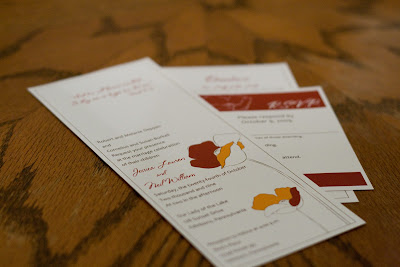


Here is the invite card:


R.S.V.P. card:

Program (front and back):


Menu card:

Here are a few shots of the whole invitation set together:


Here is the invite card:


Directions:

R.S.V.P. card:

Program (front and back):


Menu card:

Tuesday, January 26, 2010
Kristin and Some Twins
Here's some work I did recently that I never posted.

And back:

Second, this is a baby announcement I designed for my friend Kelly's sister. Kelly took the pic and it's amazing...i love it. Luckily, her sister Kim is funky and cool, so I was able to try out a more modern design. It turned out great, I think:

First, logo and business card design for Kristin Lynch. I designed and she got them printed online...Vista Print, I think. Definitely look her up if you need Web Development or other technology solutions. She's pretty awesome. Here are the cards:
Front:

And back:

Second, this is a baby announcement I designed for my friend Kelly's sister. Kelly took the pic and it's amazing...i love it. Luckily, her sister Kim is funky and cool, so I was able to try out a more modern design. It turned out great, I think:

Subscribe to:
Posts (Atom)